
构建 AI 应用时,最常见的需求之一是让 Claude 返回结构化的 JSON 数据——而不是自由文本。Claude API 提供了「结构化输出」功能,可以 100% 保证返回的 JSON 符合你定义的 Schema。这个功能已正式发布(GA),无需 beta header。
你将学到什么
- 结构化输出的两种模式
- 如何定义 JSON Schema 约束输出
- Python(Pydantic)和 TypeScript(Zod)的 SDK 集成
- 实际应用场景和最佳实践
模式一:JSON 输出(output_config)
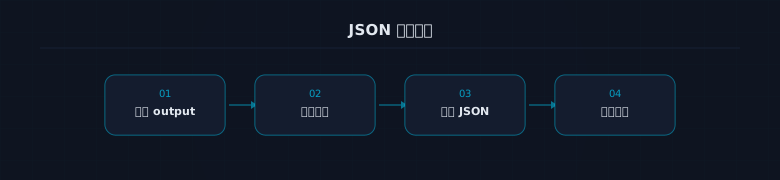 JSON 输出模式
通过 output_config.format 直接控制 Claude 的回复格式:
python
import anthropic

client = anthropic.Anthropic()

response = client.messages.create(
    model="claude-sonnet-4-6",
    max_tokens=1024,
    messages=[{
        "role": "user",
        "content": "从这段文字中提取联系人信息:我是张三,在北京工作,邮箱 zhangsan@example.com,手机 13800138000"
    }],
    output_config={
        "format": {
            "type": "json_schema",
            "schema": {
                "type": "object",
                "properties": {
                    "name": {"type": "string"},
                    "city": {"type": "string"},
                    "email": {"type": "string"},
                    "phone": {"type": "string"}
                },
                "required": ["name", "city", "email", "phone"],
                "additionalProperties": False
            }
        }
    }
)

import json
data = json.loads(response.content[0].text)
print(data)
# {"name": "张三", "city": "北京", "email": "zhangsan@example.com", "phone": "13800138000"}
关键点:
- 返回的 JSON 100% 符合 Schema
- 响应在 response.content[0].text 中,是字符串格式的 JSON
- 需要自己 json.loads() 解析
模式二:严格工具调用(strict: true)
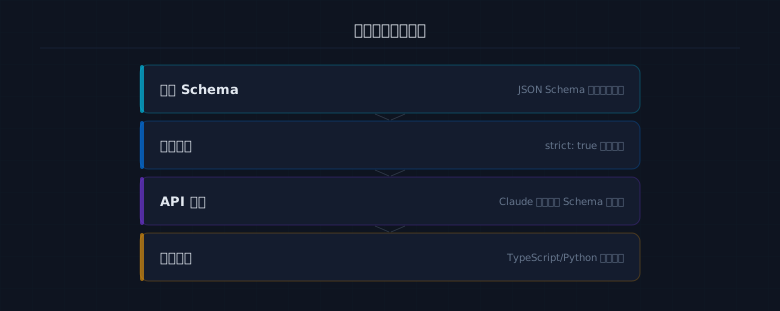 严格工具调用
通过工具定义来约束输出结构,Claude 返回 tool_use 块:
python
response = client.messages.create(
    model="claude-sonnet-4-6",
    max_tokens=1024,
    tools=[{
        "name": "extract_contact",
        "description": "提取联系人信息",
        "strict": True,
        "input_schema": {
            "type": "object",
            "properties": {
                "name": {"type": "string", "description": "姓名"},
                "city": {"type": "string", "description": "城市"},
                "email": {"type": "string", "description": "邮箱"},
                "phone": {"type": "string", "description": "手机号"}
            },
            "required": ["name", "city", "email", "phone"],
            "additionalProperties": False
        }
    }],
    tool_choice={"type": "tool", "name": "extract_contact"},
    messages=[{
        "role": "user",
        "content": "我是张三,在北京工作,邮箱 zhangsan@example.com"
    }]
)

# 结果在 tool_use block 中
tool_use = response.content[0]
print(tool_use.input)  # {"name": "张三", "city": "北京", ...}
Python + Pydantic 集成
SDK 支持直接用 Pydantic 模型定义 Schema:
python
from pydantic import BaseModel
from typing import Optional

class ContactInfo(BaseModel):
    name: str
    city: str
    email: str
    phone: Optional[str] = None
    company: Optional[str] = None

response = client.messages.create(
    model="claude-sonnet-4-6",
    max_tokens=1024,
    messages=[{"role": "user", "content": "提取:李四,上海,lisi@test.com,阿里巴巴"}],
    output_config={
        "format": {
            "type": "json_schema",
            "schema": ContactInfo.model_json_schema()
        }
    }
)

contact = ContactInfo.model_validate_json(response.content[0].text)
print(contact.name)     # 李四
print(contact.company)  # 阿里巴巴
TypeScript + Zod 集成
typescript
import Anthropic from "@anthropic-ai/sdk";
import { z } from "zod";
import { zodToJsonSchema } from "zod-to-json-schema";

const ContactSchema = z.object({
  name: z.string(),
  city: z.string(),
  email: z.string().email(),
  phone: z.string().optional(),
});

const client = new Anthropic();

const response = await client.messages.create({
  model: "claude-sonnet-4-6",
  max_tokens: 1024,
  messages: [{ role: "user", content: "提取:王五,深圳,wangwu@test.com" }],
  output_config: {
    format: {
      type: "json_schema",
      schema: zodToJsonSchema(ContactSchema),
    },
  },
});

const data = ContactSchema.parse(
  JSON.parse(response.content[0].text)
);
实际应用场景
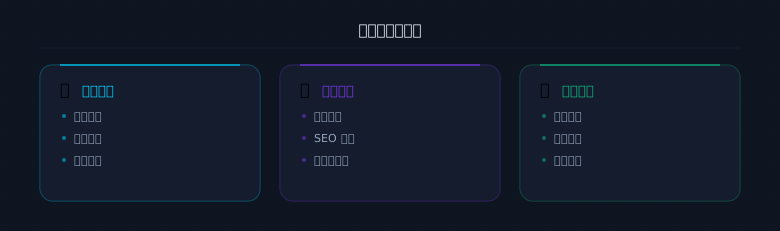 实际应用场景
场景一:内容分类
python
schema = {
    "type": "object",
    "properties": {
        "category": {"type": "string", "enum": ["技术", "商业", "生活", "娱乐"]},
        "tags": {"type": "array", "items": {"type": "string"}, "maxItems": 5},
        "summary": {"type": "string"},
        "sentiment": {"type": "string", "enum": ["positive", "negative", "neutral"]}
    },
    "required": ["category", "tags", "summary", "sentiment"],
    "additionalProperties": False
}
场景二:数据提取
从非结构化文本中提取结构化数据——简历解析、发票识别、日志分析等。
场景三:API 中间层
Claude 分析用户意图,输出结构化指令,下游系统执行。
Note: 结构化输出保证格式正确,但不保证数据的准确性。Claude 可能在理解原文时出错,只是输出格式一定是对的。
两种模式如何选择
 两种模式对比
- output_config:当你只需要 JSON 数据,不需要 Claude 的文字解释
- strict 工具:当你需要 Claude 同时给出文字回答和结构化数据
实战练习
Tip: 用结构化输出处理你实际工作中的数据。
- 定义一个 Schema,让 Claude 从一段产品描述中提取价格、功能、目标用户
- 用 Pydantic/Zod 验证返回的数据
- 尝试一个批量场景:循环处理 10 段文本,提取结构化数据
关键要点
Note: 本文核心总结
- 结构化输出已 GA,100% 保证 JSON 符合 Schema
- 两种模式:output_config(纯 JSON)和 strict 工具(tool_use)
- Python 用 Pydantic、TypeScript 用 Zod 定义 Schema
- 格式保证正确,但数据准确性取决于 Claude 的理解能力